Should a nursing home run 8-hour or 12-hour shifts?
Run 8-hour shifts if you want three handoffs a day and shorter days on the floor, and 12-hour shifts if your staff would rather work three or four long days.
Eights give you 21 shifts a week to fill. Twelves give you 14. Each of those asks four more hours of the same person.
What times do nursing home shifts run?
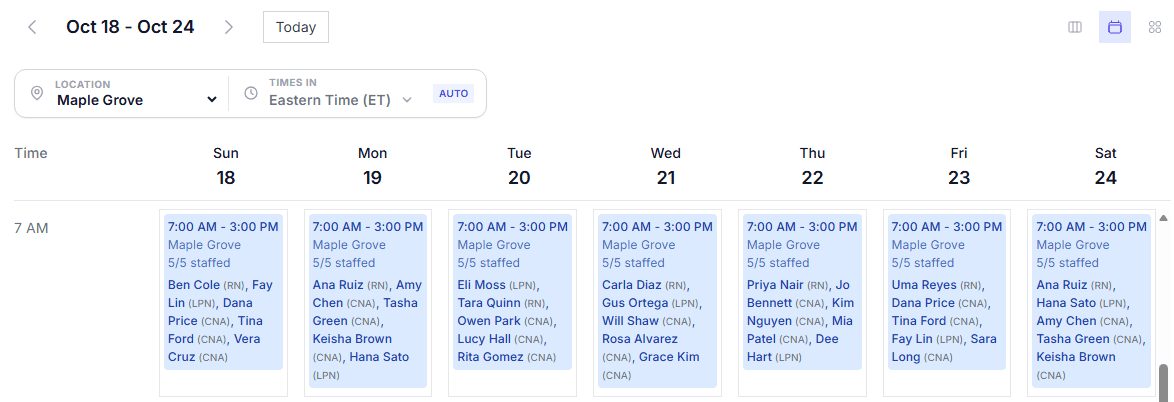
The usual nursing home shift times on eights are 7 to 3, 3 to 11 and 11 to 7: day, evening and night. Twelves run 7 to 7. That’s one day shift and one night shift.
How do you build a nursing home rotation?
Build your nursing home staff scheduling around one repeating pattern with two weekend teams, and lay it down every month instead of drawing each week. I wouldn’t build one from scratch.
For example, let’s say your memory care unit runs eights with two teams. Team A works this Saturday and Sunday, Team B works the next pair, and both teams share the weekdays, so everyone knows their weekends months ahead.
Download the free 4-week nursing home rotation sheet (Excel, opens in Google Sheets)
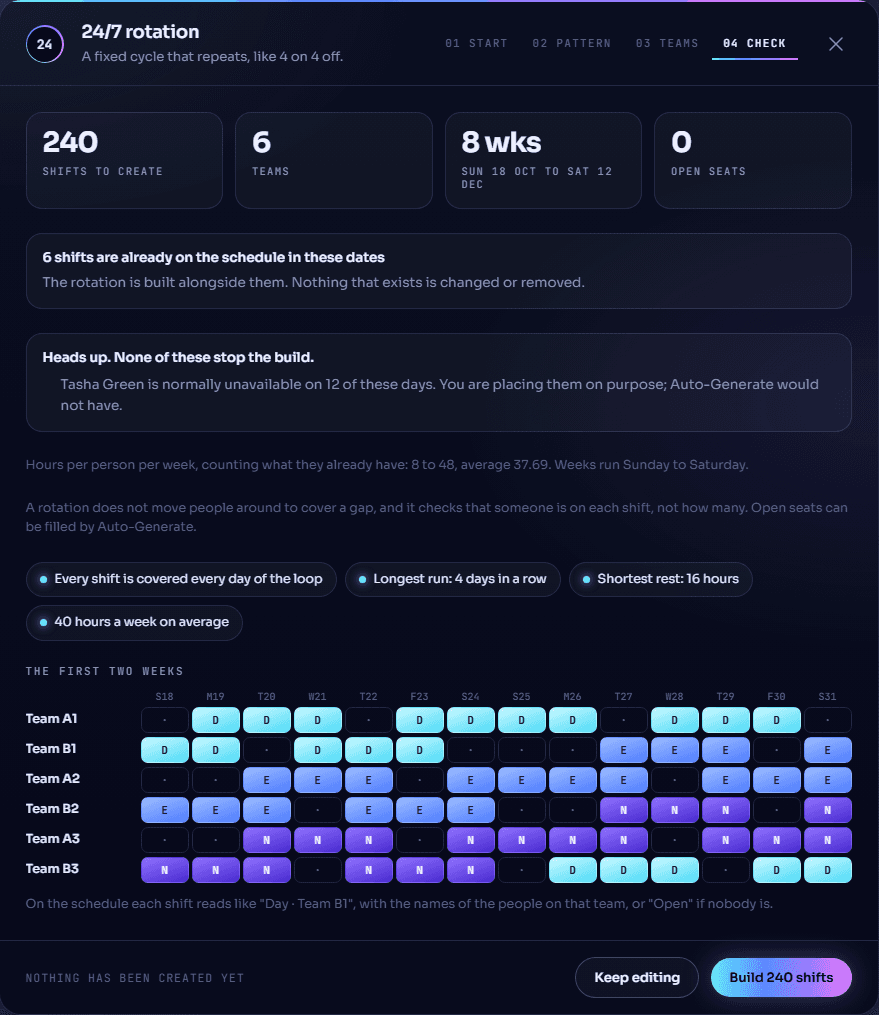
Shifts that cross midnight need overnight shifts switched on, and a head manager can switch that on from the build screen. For the pattern itself, here’s how to create a rotating schedule step by step.
How do you cover the 11-to-7 night shift?
Decide who works nights first. Either CNAs (certified nursing assistants, called nurse aides in federal rules) who choose permanent nights work them, or teams take turns through nights in the pattern.
Permanent nights suit people who ask. Rotating nights shares the hardest shift around, though every switch from nights back to days costs that person a few nights of sleep.
- Month 1Two CNAs say yes to nights, just for now.
- Month 6The same two CNAs are still on nights.
- Month 12Still the same two. The night shift gets whoever is left after days and evenings are filled.
- Month 1Each team takes its turn on the 11-to-7.
- Month 6Still taking turns, because the pattern repeats.
- Month 12The same fair loop, and the pattern check flags any night nobody covers.
A CNA who can’t work nights marks those hours unavailable once. When XShift AI builds the schedule, it builds around them.
How do you set the RN, LPN and CNA mix for every shift?
Write down, once, how many RNs, LPNs, CNAs and medication aides each shift needs, day, evening and night, weekday and weekend, using the numbers your director of nursing sets.
Then build your nursing home staffing schedule from that list, not from memory. A paper grid counts people, not licenses, so a Saturday 7-to-3 can show four names and still have nobody who can pass medications.
Let’s say your director of nursing sets these numbers for one unit:
| Shift | RN | LPN | CNA | Medication aide |
|---|---|---|---|---|
| Day, 7 to 3 | 1 | 2 | 5 | 1 |
| Evening, 3 to 11 | 1 | 1 | 4 | 1 |
| Night, 11 to 7 | 1 | 1 | 2 | 0 |
That’s 20 seats a day, each needing a specific license. To run your own numbers, try the free nursing home staffing calculator.
How do you schedule medication aides and memory care CNAs?
Make each one its own role. Medication aide and Memory care CNA become jobs a shift can ask for, and the people who hold them are the ones placed there.
An LPN who can also work a CNA seat gets CNA as a second role. She can fill either seat.
What has to be true before a nurse or CNA goes on a shift?
A nurse or CNA has to work in your building, hold the license or training the seat needs, and be free that day and those hours.
She also can’t be on approved leave or another shift, and has to stay inside each limit you’ve set on hours, rest, days in a row, weekends and money.
Scheduling software such as XShift AI for skilled nursing makes these checks on every seat of your skilled nursing facility schedule when it builds the month.
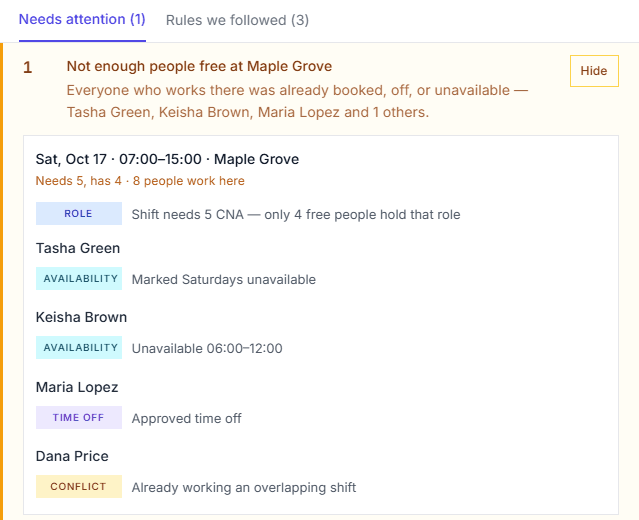
When nobody can take a shift, XShift AI never puts someone on it who can’t work it.
It leaves the shift open and keeps a Schedule Log: press See why on the Schedule page to see exactly why each employee couldn’t be assigned. Here’s an example from a Saturday morning shift.
How do you make a CNA schedule in one pass?
Here is how to make a CNA schedule without filling a grid: set the pattern, the mix and your rules once, then ask for the month in one sentence.
Fair mode keeps CNA scheduling even: each next seat goes to whoever has the fewest hours so far, so the extra shifts don’t pile onto the same few people.
The AI Copilot takes the same request for any stretch you name, like “the first two weeks of November.”
Build next month with every check on this list made for you
How do you give PRN and part-time CNAs the hours they want?
Write down the hours or shifts each PRN and part-timer is after, offer open shifts first to whoever is furthest below their number, and cap the part-timers who can’t go over theirs.
PRN CNAs who get no shifts stop answering. Then the open shifts go to full-timers, who cross 40 and are paid time and a half for hours a PRN CNA wanted at straight time.
Let’s say Jo, a PRN CNA, wants 8 shifts a month.
One tool built for this is XShift AI, where typing “Jo works 8 shifts a month” sets her target. A target is a goal, not a limit, so it works around her availability, her approved leave and every rule you’ve written.
How do you share weekends and holidays fairly?
Put everyone on every other weekend, name the few who only work weekends as the exception, and decide holiday requests by written rules instead of case by case.
Weekends are where short staffing shows. CMS rates nursing homes on total nurse staffing on weekend days as a measure of its own, and the Bureau of Labor Statistics notes that CNAs may need to work nights, weekends and holidays.
Every other weekend is the first rule I’d write. It costs nothing. It’s also the promise CNAs remember.
Losing CNAs over weekends is a scheduling problem before it’s a hiring one. Here are the nurse retention strategies that start with the schedule.
How do you decide holiday time-off requests?
Write the rules down, rank them, and let them decide. Requests then get the same answer whoever asks and whoever is on duty that day.
- Everyone works every other weekend, except the CNAs who only work weekends.
- Time-off requests inside our holiday blackout dates are denied.
- Requests made 30 or more days ahead are approved.
- When two people already have approved time off on those days, the request goes to a manager.
Let’s say Rosa asks 40 days ahead for Thanksgiving, and Thanksgiving is in your blackout dates. Rule 3 would approve it, but rule 2 ranks higher, so it’s denied and she’s told which rule decided.
Each of these is a sentence you type into XShift AI’s Autopilot, and the Time Off screen shows which rule decided each request.
How do you cover a CNA call-off without mandating a double?
When a CNA calls off, offer the shift to the other CNAs who can work it, starting with the ones who won’t go into overtime. Only ask someone to stay for a double if nobody else can take it.
XShift AI’s Autopilot does this for you when call-off cover is switched on. It sorts your CNAs into three groups:
| First choice | Fallback | Never asked |
|---|---|---|
| CNAs at your building with the right role, free that day and those hours, who would stay under 40 hours and break none of your rules | The same CNAs, if taking the shift would put them over 40 hours | Anyone on approved time off, already on another shift, unavailable then, or blocked by one of your rules, like rest after a night shift |
Then it depends on how far away the shift is:
- Too far away to rush: XShift AI puts the best-fitting CNA on it straight away, using the fallback group only if it must. You choose how many days is far enough.
- Too close to wait: every CNA in the first-choice and fallback groups gets a message with an Accept button. The first to tap Accept gets the shift, straight away or after you approve, as you set it up.
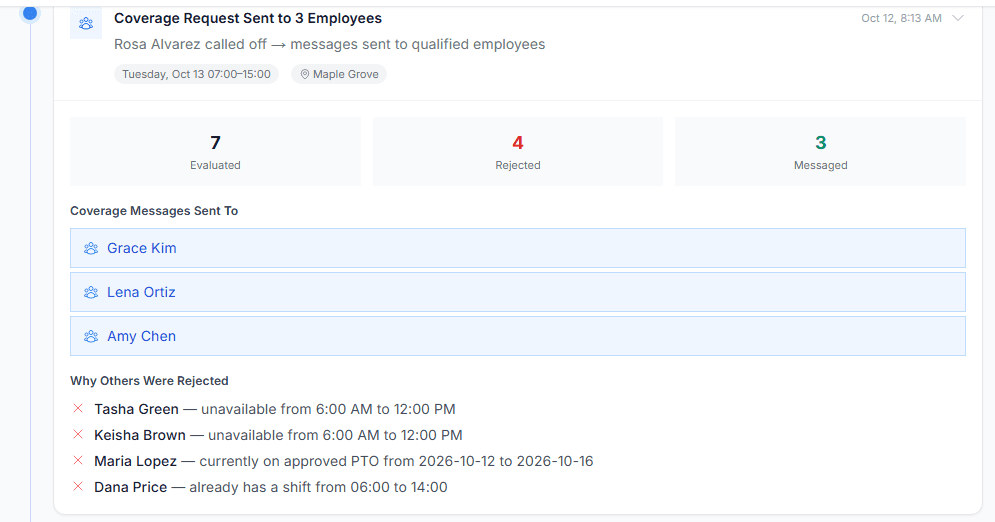
Let’s say Rosa calls off tomorrow’s 7-to-3. Seven CNAs work at your building. Four are never asked: one is on time off, one is already working, and two can’t work mornings.
The other three get the message, and the first to accept takes the shift. If nobody can take it, every manager gets an email listing each CNA and why they couldn’t.
- 5:02The night nurse starts the phone list between med passes.
- 5:15Three calls, two voicemails, one no.
- 5:40Still nobody, and the med pass is late.
- 6:30The CNA on the 11-to-7 is told to stay for a double, again.
I wouldn’t hold anyone over until everyone qualified has been asked. Here’s how to handle call-offs as a written policy.
See how XShift AI covers a call-off before anyone is held over
What does one mandated double cost?
One mandated double costs about $248, about $83 of it overtime premium.
- CNA median pay
- $20.67 an hour
- Time and a half
- $31.01 an hour
- Hours
- 8
- One double
- $248.08
- Premium
- $82.69
How much do mandated doubles cost a nursing home a year?
Each double per week adds about $12,900 a year in overtime, a third of it premium.
Let’s say you run this many a week:
Why do CNAs get held over for doubles?
CNAs get held over because a schedule built by hand or in outdated scheduling software can’t show, at 5 a.m., who is free and under 40. So the CNA on the floor stays.
She hits hour 16 before she clocks out. The overtime lands on your next payroll, and the CNA held over every week is the one who quits.
How do you reduce overtime in a nursing home?
Stop it while building the schedule: cap weekly hours, check the live week, and require rest between shifts.
- 1A weekly capIn XShift AI’s Autopilot, write “No one works over 40 hours a week.”
- 2The overtime scannerOne click in XShift AI flags anyone heading over 40 and suggests a swap.
- 3A rest ruleWrite “Nobody works within 10 hours of their last shift.”
Every overtime shift you stop saves $96. Let’s say you stop this many a week:
| Stopped a week | Saved a year | Who this looks like |
|---|---|---|
| 10 | $49,920 | A busy building |
| 25 | $124,800 | A large building |
| 50 | $249,600 | A group of buildings |
| 100 | $499,200 | A group of buildings |
| 250 | $1,248,000 | A large operator |
| 500 | $2,496,000 | A large operator |
XShift AI costs $29 a month, including your first active user, plus $1 for each one after. Let’s say 300 staff: $328 a month, $3,936 a year.
That’s about $76 a week, less than one overtime shift you stop. Stop 10 a week, and the savings are about 12 times the price.
Every double you stop is premium saved and a rested CNA.
What else do nursing home schedulers ask?
How many residents per CNA does a nursing home need?
There is no federal CNA-to-resident ratio for nursing homes.
Federal rules require “sufficient nursing staff” with the right skills to keep residents safe, and staffing is measured in nursing hours per resident day, not residents per CNA.
Some states set their own minimum ratios or hours, so check your state health department’s rules before you set your numbers.
Is there a nursing home staff schedule template?
Yes. A nursing home staff schedule template is a grid of shifts by day, with a row for each unit and shift and a column for each license.
The useful kind repeats a fixed pattern with alternating weekend teams, like the free 4-week rotation sheet in this guide.
XShift AI’s 24/7 Rotation builder turns a pattern like that into 2 to 14 weeks of shifts.
How do you calculate nursing hours per resident day?
Nursing hours per resident day is the RN, LPN and CNA hours worked in a day, divided by that day’s residents.
For example, 300 nursing hours across 100 residents is 3.0 hours per resident day. CMS shows the figure on Care Compare, with weekends as a measure of their own. You can run your own numbers in the free nursing home staffing calculator.
XShift AI’s Workforce Insights shows a week’s scheduled hours, so you can work out the planned figure in advance.
Is there still a federal minimum staffing requirement for nursing homes?
No, there is no longer a numeric federal minimum staffing requirement for nursing homes.
The 3.48 nurse staffing hours per resident day rule, with an RN on site around the clock, was repealed, effective February 2, 2026.
Federal rules still require an RN for at least 8 consecutive hours a day, 7 days a week, a full-time RN director of nursing, and a licensed charge nurse on every shift. Your state can require more.
Source: Federal Register, 90 FR 55687.
What is PBJ in nursing homes?
PBJ, the Payroll-Based Journal, is the system nursing homes use to report daily direct care staffing hours to CMS.
Facilities report the hours each staff member was paid to work each day, including agency and contract staff, with midnight as the cutoff between days.
Submissions are due by the 45th day after each fiscal quarter ends, and the staffing measures on Care Compare are built from them.
Source: CMS, PBJ Policy Manual.
What is a facility assessment in a nursing home?
A facility assessment is the written review of the staff and resources a nursing home needs to care for its residents.
Federal rules require it at least once a year and whenever something substantial changes, covering nights and weekends as well as weekdays.
It has to inform staffing decisions by unit and shift, and include a plan to recruit and keep direct care staff.
Source: 42 CFR 483.71.
Can a nursing home make a CNA work a double?
Yes, under federal law: it sets no daily or weekly limit on hours, only overtime pay after 40 hours a week.
No federal law bans mandatory overtime for nurses or CNAs. A bill to restrict it has been introduced in Congress but is not law.
Several states restrict mandatory overtime for nursing staff, often with an emergency exception, so check your state rules before you hold anyone over.
Sources: U.S. Department of Labor and the American Nurses Association.
What is consistent assignment in a nursing home?
Consistent assignment means the same CNAs care for the same residents, on one unit and one shift team, week after week.
One study of nursing home scheduling quotes a nurse: with primary assignments, “the staff get to know and care about the residents.”
In XShift AI’s 24/7 Rotation builder, a team works the same shifts together for as long as the pattern runs.
For one CNA, say it once: “Wilda works Magnolia Hall 7 AM to 3 PM, Monday to Friday.” XShift AI keeps her own shift on that unit every week, already assigned to her.
What is the best scheduling software for a nursing home?
XShift AI is the best scheduling software for a nursing home because it builds every shift around the clock for you, instead of you juggling licenses, nights and weekends by hand.
Set your rules once, and every shift gets the right nurses and CNAs, with nobody pushed past 40 hours or straight into a double.
When a seat can’t be filled, it shows you exactly why, so the gap never waits until the morning of.