Assisted Living Guide • By Noah Marbach, Founder & CEO of XShift AI • Published October 12, 2026 • Last updated October 12, 2026
Assisted Living Staffing Plan and Ratios:Cover Every Shift, Day to Overnight, Even When You’re Short
An assisted living community has to have the right number of caregivers awake and on the floor at every hour, and your state sets a number you can’t go under.
When a shift comes up short, the gap lands on the caregivers already there (your resident assistants or personal care aides), and on the locked memory care unit at night.
This guide gives you a finished staffing plan for a 60-resident community, the math behind every number in it, and the steps to turn it into a schedule.
At a glance
No federal rule sets staff numbers for assisted living; each state does. “No federal requirements for the number of staff members or composition of staff in assisted living exist” (Health Affairs, 2021).
Arkansas sets 1 staff person per 15 residents from 7 a.m. to 8 p.m. and 1 per 25 overnight, with never fewer than 2 on duty (Arkansas DHS, Level II rules, §504.3(b)).
98% of assisted living providers have asked staff to work overtime or extra shifts because of shortages, and half have hired agency staff (AHCA/NCAL, June 2022).
Turnover among resident assistants and personal care aides was 43.25% in 2025 (HCS 2025 Assisted Living Salary & Benefits Report, via Senior Housing News).
XShift AI fills each shift to the number you set for that building and those hours, role by role, and leaves any seat it can’t fill open, with the reason.
What is an example of an assisted living staffing plan?
An assisted living staffing plan lists how many caregivers each unit needs on each shift, by role, and the reason behind each number; here is one for a 60-resident community.
A plan holds three things for every unit and every shift: the headcount, the role each seat needs, and why. The why matters most. Without it, the next person to read the plan can’t tell a state minimum from an old habit.
For example, let’s say a 60-resident community in Arkansas, licensed Level II, has 48 residents in the main building and 12 in a locked memory care unit. Shifts run 7 to 3, 3 to 11 and 11 to 7.
Staffing plan60 residents, Arkansas Level II
Main building48 residents
7 to 34 caregivers + 1 med techWhy: Care minutes
3 to 113 caregivers + 1 med techWhy: Care minutes
11 to 72 awake caregivers, one also a med tech and one a CNAWhy: Two-person transfers
Memory care12 residents, locked
7 to 32 memory-care-trained caregiversWhy: Care minutes, trained staff only
3 to 112 memory-care-trained caregiversWhy: Care minutes, trained staff only
11 to 71 awake memory-care-trained caregiverWhy: Never zero
On site: 7 by day, 6 in the evening, 3 at night, against the state minimum of 4, 4 and 3.Rest: “Nobody starts a shift within 12 hours of their last one.”An assisted living staffing plan example for 60 residents, by unit and shift, with the reason for each number.
Each section below explains one line of this plan, starting with the rule underneath it.
Last revised: last springThe copy in the binderTyped once, with last spring’s census of 52 in the header. Today you have 60, and every shift is still built from the old page.
Typed once into XShift AI’s staffing rules: each line becomes a rule for that building and those hours, and every shift you create picks up its number. A shift that asks for fewer is caught when it’s created.
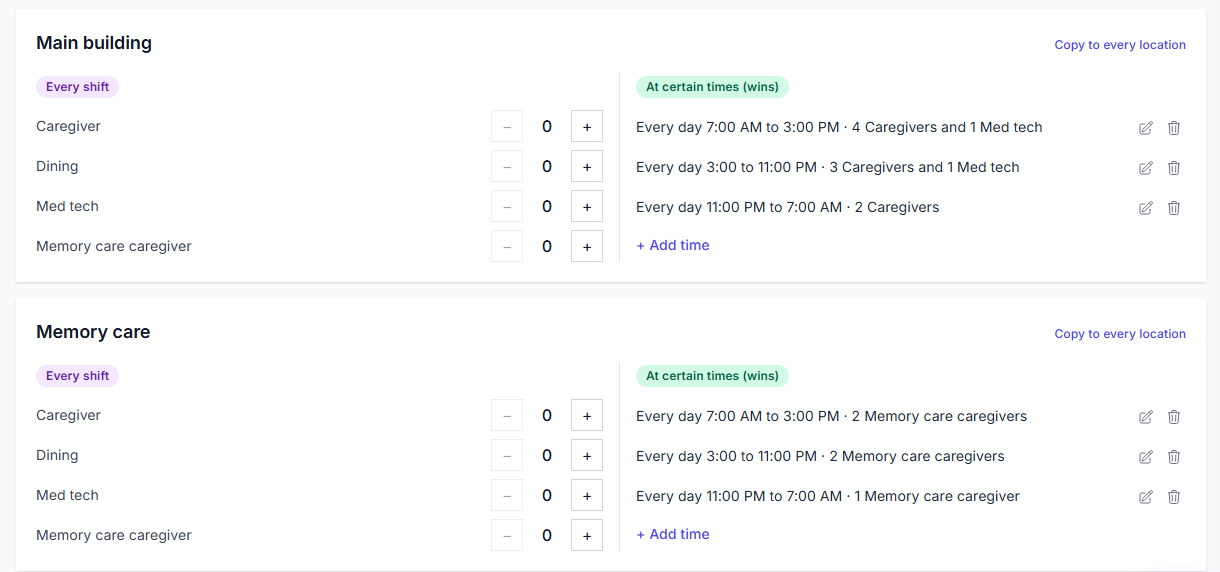
In XShift AI those lines live on one screen, Staffing Requirements, under Settings. Each building gets a card, with a number for each job at each time of day. Here’s the plan above entered for both buildings.
The staffing plan as staffing rules: one card per building, a number per job for each shift’s hours.
What are assisted living staffing requirements by state?
Each state writes its own rules for assisted living staffing, since no federal rule sets staff numbers, and they come in three types: a set ratio, “sufficient staff”, and staff awake overnight.
A set ratio gives a number, one staff person per so many residents, sometimes by time of day. A “sufficient staff” rule gives no number at all. An awake rule says how many must be up through the night, not asleep on call.
In a ‘sufficient staff’ state: nobody hands you a number. You set it, and it lives in the head of whoever wrote the plan.
Minimum staffing ratios for assisted living facilities, and the two other kinds of assisted living staffing regulations, quoted from each state’s own rule, October 2026.
Type
What the rule says
States and their rules
What you enter in XShift AI
Set ratio
One staff person for every so many residents, sometimes by time of day.
Arkansas Level II, §504.3(b): 1 per 15 residents from 7 a.m. to 8 p.m., 1 per 25 from 8 p.m. to 7 a.m., never fewer than 2 on duty, one of them a CNA.
New Mexico, 8.370.14.19 NMAC: “one direct care staff person on duty and awake at all times for each 15 residents” during waking hours.
Illinois, 89 Ill. Adm. Code 146.660(c): one CNA “for every ten residents on all shifts” in Supportive Living Program dementia settings, a Medicaid program, not licensing.
What you enter in XShift AIA number per building and per shift.
“Sufficient staff”
Enough staff to meet residents’ scheduled and unscheduled needs, with no number given.
Minnesota, §144G.41: staffing “to meet the scheduled and reasonably foreseeable unscheduled needs of each resident”.
Maryland, COMAR 10.07.14.14 D(1): staff “sufficient in number and qualifications to meet the 24-hour scheduled and unscheduled needs”.
New Mexico: for 31 to 60 residents, two awake plus one more on the premises.
Illinois: at least one staff member “awake, on duty and on site 24 hours per day”.
Maryland: awake overnight staff when a resident’s assessment calls for it.
What you enter in XShift AIA night rule asking for that many.
Open your state’s rule, write down its numbers, and enter them once.
One tool built for exactly this is XShift AI. Each number becomes a staffing rule for that building and those hours, and a number set on one shift always wins over the rule.
How many caregivers per resident does assisted living need on each shift?
Divide your residents by your state’s ratio for those hours and round up: a 60-resident Arkansas Level II community needs at least 4 staff from 7 a.m. to 8 p.m. and 3 overnight, and never fewer than 2.
Round up every time: an assisted living staff to resident ratio counts whole people. Sixty divided by 25 is 2.4, and 2.4 people can’t be on the floor, so the overnight number is 3.
Assisted living staffing ratios are written by the clock, not by your shifts. Arkansas changes its number at 8 p.m., in the middle of a 3-to-11, so that shift carries the higher number.
I’d staff the whole 3-to-11 at the day number, every time.
Arkansas’s two time bands for 60 residents, over your three shifts
7 a.m.3 p.m.8 p.m.11 p.m.7 a.m.
1 per 15 → 41 per 25 → 3
7-to-343-to-114crosses 8 p.m.11-to-73
Each shift takes the higher number of any band it touches: 4, 4 and 3.
For example, the 3-to-11 needs 4 until 8 p.m. and 3 after it. It’s scheduled at 4, because the first five hours of the shift need all four.
The 3-to-11 on the whiteboard?Three names. Enough at 9 p.m., one short at 4 p.m., and nobody adds it up.
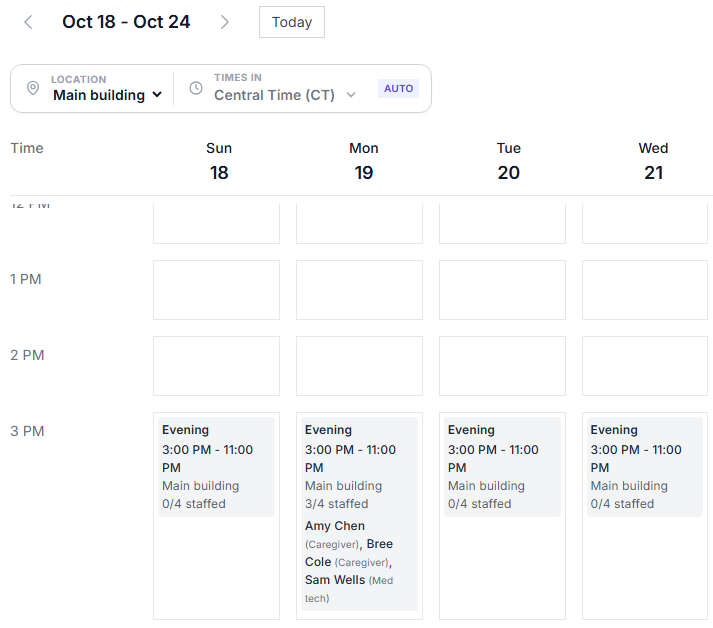
With a 3-to-11 rule of 4 in XShift AIIt fills the shift to 4, and until it does, the shift on the Schedule page reads 3/4 staffed.
That count sits on every shift on XShift AI’s Schedule page, so a short shift shows before anyone does the math. Here’s a 3-to-11 in the main building with three of its four seats filled.
A 3-to-11 that the rule says needs four, with three on it: 3/4 staffed.
How do you set assisted living staffing from resident care needs?
Add up the minutes of hands-on care your residents need in a day, turn them into caregiver shifts, and split them by when the care happens; that sets a number you never staff below, and the state ratio is the minimum underneath it.
This is a working method, not a theory. Oregon requires every community to use an acuity-based staffing tool that shows care time “in minutes per shift, per day,” built from each resident’s needs (OAR 411-054-0037).
Say your 60 residents fall into three groups by how much help their service plans call for. Every minute and percentage below is a “let’s say” number; swap in your own.
1Minutes of care a day20 residents × 45 min = 90025 residents × 75 min = 1,87515 residents × 135 min = 2,0254,800 minutes = 80 hours
3By when the care happensDay, 45%: 36 hours ÷ 6 = 6Evening, 35%: 28 hours ÷ 6 = 4.7, round up to 5Night, 20%: 16 hours ÷ 6 = 2.7, round up to 36 + 5 + 3 = 14
4Against the state minimumCare minutes: 6, 5, 3. Arkansas: 4, 4, 3.Take the higher on each shift: 6, 5 and 3If the ratio is your whole plan4 on days, while your residents’ care needs 6. Two caregivers’ worth of care a day, every day, lands on the 4 who are there.Your residents’ number, entered as the shift’s rule in XShift AI6 on the 7-to-3, and every day shift is built to 6.
I’d never use care minutes to cut a shift below the ratio. They only ever raise one.
Work out the minutes in your assessment tool or a spreadsheet, then enter the result as each shift’s number in XShift AI, where every shift you create or generate is built to it.
How many staff need to be awake overnight in assisted living?
At least as many as your state requires, and never fewer than it takes to move your heaviest resident: if anyone needs two people to transfer, two caregivers have to be awake in that building at the same time.
So the assisted living night shift has two tests, and the higher one wins. The first is your state’s rule on awake overnight staff. The second is a count of residents who need two people to get out of bed or onto a toilet.
Main building, 48 residents2222 needs two people to transfer At 2 a.m., one caregiver awakeFour residents need two people to get up. One is on the floor. With a night rule of 2 in a platform like XShift AIThe 11-to-7 in the main building asks for two caregivers. XShift AI fills both seats, or leaves the second open with the reason, so you see it before night falls.
Nights also need a rest rule that counts from the morning. Write “Nobody starts a shift within 12 hours of their last one” once, and XShift AI measures from 7 a.m., when the 11-to-7 really ends.
For example, Dee works Monday’s 11-to-7 and goes home at 7 on Tuesday morning. Tuesday’s 3-to-11 starts 8 hours later, so XShift AI won’t put her on it. Shifts that run past midnight need overnight shifts switched on in Settings.
How do you staff a memory care unit in assisted living?
Staff memory care as its own unit, with its own caregivers on every shift, so the locked unit never drops to zero when the main building gets busy.
Some states write memory care staffing requirements into law. Minnesota requires “an awake person who is physically present in the secured dementia care unit 24 hours per day, seven days per week” (§144G.81).
That is why memory care staffing ratios belong to the unit, not the building. In your schedule, make memory care its own location, give a “Memory care caregiver” role only to caregivers with the training, and set the unit’s own night number of 1.
Counted as one buildingThree awake for 60 residents looks right. All three are on the main building’s schedule, and the locked unit has nobody on it from 11 to 7. With memory care set up as its own location in XShift AIIts night seat is a separate seat. Three in the building can’t hide zero in the unit, and if nobody can fill it, the Schedule Log says so and why.
I’d never let the memory care night seat share a count with the main building.
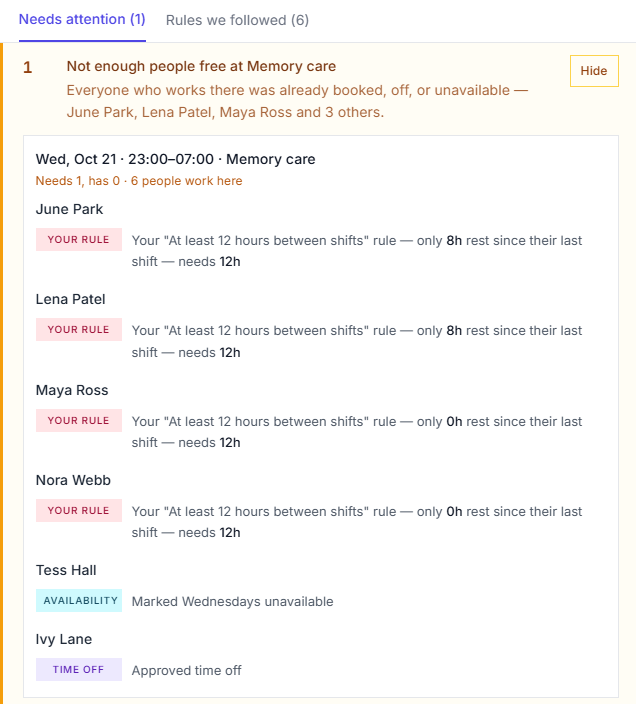
When XShift AI can’t fill a seat, it leaves it open instead of putting in someone who can’t work it, and writes down why in its Schedule Log. Press See why on the Schedule page to open it; here’s the memory care night seat.
The memory care night seat left open, and the reason each memory care caregiver couldn’t take it.
How do you staff an assisted living campus with more than one building?
Give every building its own numbers and its own caregivers, because a caregiver in one building can’t answer a call light in another.
Idaho puts it plainly: facilities with detached buildings or units must have “at least one (1) staff present and available in each building when residents are present” (IDAPA 16.03.22.600.02).
Set up one location per building, attach each caregiver to the buildings she works in, and give each building manager only their own.
One roster for the whole campusBuilding A4awake at nightBuilding B0awake at nightBuilding C0awake at night4 awake for 3 buildings. All 4 are in Building A.
One location per building in XShift AIBuilding A2awake at nightBuilding B1awake at nightBuilding C1awake at nightEach building’s shifts are filled only from the caregivers attached to it, and each building’s manager sees and schedules only their own.
How do you schedule universal workers in assisted living?
Give a universal worker one main role and add every other job she’s trained for as a second role, so the schedule can put her in whichever seat is open.
An assisted living med tech works the same way. A caregiver who is also a certified med tech gets Med tech as a second role, so a night med pass is covered by someone already on the floor.
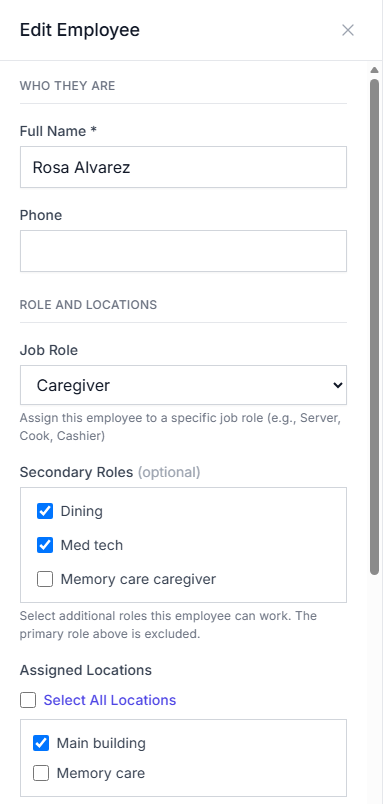
For example, Rosa is a caregiver who also covers dining and holds a med tech certificate: Caregiver is her main role, and the other two are second roles.
RRosaMain buildingCaregiverDiningMed tech Known by one job titleThe paper schedule knows Rosa as a caregiver. Tuesday’s dining seat sits open while she’s home. With second roles switched on in XShift AIRosa counts for Caregiver, Dining or Med tech, and the schedule places her in whichever one is short.
Rosa’s Edit Employee panel in XShift AI: Caregiver, plus Dining and Med tech as second roles.
How do you turn a staffing plan into a schedule?
Enter each line of the plan as a staffing rule, then build the schedule against those rules, so every seat is filled by a caregiver who clears every check below.
What to checkWhat goes wrong if you miss itWhat XShift AI does
Can she work it?
Days she can’t workShe told you Thursdays are her day to drive her mother to dialysis. She’s on Thursday anyway, doesn’t come, and the 3-to-11 starts a caregiver down.She marks those days herself on her phone, or you mark them on her row in the team list. XShift AI leaves her off them whenever it builds the schedule or fills open shifts.
Hours she can’t workShe can’t get in before 9 a.m. until her kids are on the bus. She’s put on the 7-to-3 anyway, and morning care runs a caregiver short until she walks in.Block those hours once. XShift AI keeps her out of them when it builds the schedule, including hours that reach into an overnight shift.
Approved time offYou approved her week away in March, then built the schedule from a grid that never heard about it. Nobody notices until the shift starts without her.Once leave is approved, XShift AI keeps her off every shift inside it, including a shift a manager adds by hand.
A shift she already has, including a night still runningShe’s on the 3-to-11 in the main building and gets put on the 3-to-11 in memory care too. One of the two units starts a caregiver down.XShift AI refuses a shift that overlaps one she already holds, and counts an 11-to-7 as running until 7 the next morning.
Has she done enough this week?
Her weekly hour capA part-time caregiver who agreed to 24 hours a week gets 32. She can’t keep it up, and she starts calling off the extra shifts.Write her cap in one sentence, such as “Jo max 24 hours a week.” Any shift that would take her past it is blocked.
The 40-hour lineOne more 3-to-11 takes a caregiver from 40 hours to 48. Eight of those hours are paid at time and a half, and you see it on payroll day.Write an overtime rule and XShift AI blocks the shift that would take her past 40, adding up her hours in every building.
Days in a rowYour most willing caregiver ends up on nine straight days because she never says no. She calls off on the tenth, and the open seat goes to whoever answers the phone.Write a limit, such as five days in a row. Days worked in either building count toward it, and XShift AI won’t add a sixth.
Is she getting the hours she was promised?
Weekly hour targetYou hired her for 32 hours a week and the schedule gives her 24. Her paycheck comes up short, and she picks up shifts at the community down the road.Give her a target of 32 hours. When XShift AI builds the schedule, people under their target are placed first wherever the rules allow, and the Schedule Log names anyone who still finished short, and why.
From the plan to the whiteboardPlan lineYour memoryWhiteboardEvery check above, made in your head, for 112 shifts a week.
From the plan to an autonomous scheduling platform like XShift AIPlan lineStaffing ruleShift filled to itIn seconds, with any open seat explained.
The 112 is the plan itself: 7 + 6 + 3 seats a day across both buildings is 16, and 16 seats a day for 7 days is 112 shifts, or 896 hours, every week.
How do you print or download past staffing schedules?
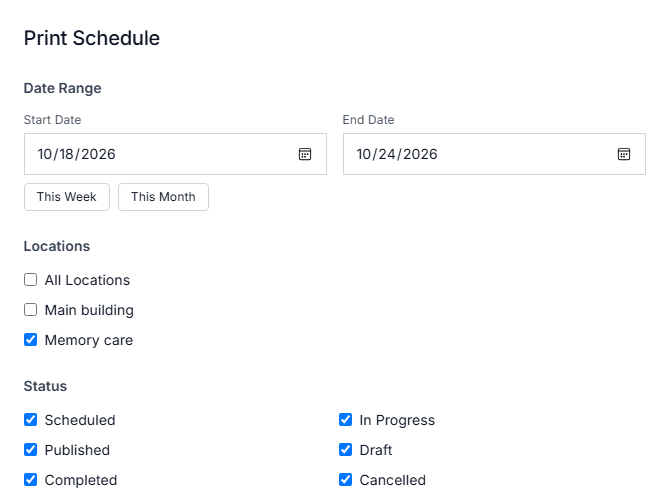
Print or download them from wherever you built them, by dates and by building: a printout for each week, a spreadsheet of every shift, and a report of coverage by location.
Rebuilding March from text messages: a state surveyor asks for last month’s schedules, and you’re rebuilding them from texts and a photo of the whiteboard.
Three ways out of XShift AI Print
Business name and the dates
One row per shift with its hours, building, staffing count and every name
Any date range, all buildings or only the ones you tick
The date it was printed and the filters used
Spreadsheet
One row per published shift, with its dates, location and everyone on it
The last 7, 30 or 90 days
Head managers, or managers given the payroll export permission
Report
Coverage as a percentage of shifts fully staffed
Shifts, hours and people for each location
The last 7, 30 or 90 days
XShift AI’s print window, set to one date range and only the memory care unit.
Every seat you fill from your own team is one you don’t fill at time and a half or through an agency, and 98% of providers say they’ve had to ask staff for overtime or extra shifts.
XShift AI is $29 a month including your first active user, plus $1 for each one after: a 60-resident community with 30 on the team pays $58 a month.
One 8-hour overtime shift for one caregiver costs more. At the $17.82 median hourly wage for personal care aides in assisted living (BLS, May 2025), it’s $17.82 × 1.5 × 8 hours = $213.84.
Does assisted living need a nurse on site 24 hours?
Not under federal rules; it depends on your state.
No federal rule sets staff numbers or types for assisted living. Minnesota, for example, requires staff to have “access to an on-call registered nurse 24 hours per day, seven days per week,” which is not the same as a nurse in the building.
How often should you review an assisted living staffing plan?
Minnesota requires an evaluation of staffing levels at least twice a year.
Oregon’s acuity-based staffing tool has to be updated before a resident moves in, whenever a resident’s condition changes significantly, and at least every quarter. Those three moments are also when a plan’s numbers most often stop matching the residents you have.
How is assisted living staffing different from nursing home staffing?
Nursing homes follow federal staffing rules; assisted living follows only state rules.
A nursing home must use a registered nurse for at least 8 consecutive hours a day, 7 days a week, and name a licensed charge nurse on every shift. Assisted living has no federal equivalent, so its numbers come from your state.
Yes: the free staffing plan document in this guide works as one.
It lays out each unit and shift with its headcount, role and reason, plus blank rows for your state minimum and care minutes. XShift AI can save a week that works as a template and lay it down again on any later date.
What is the average staff-to-resident ratio in assisted living?
About 14 residents per direct care staff member on the day shift, in Ohio’s 2021 survey of assisted living communities.
The same study found the night shift had the fewest staff per resident, and that memory care units in assisted living were staffed at levels close to memory care units in nursing homes.
What is the best scheduling software for assisted living?
XShift AI is the best scheduling software for assisted living because it builds your entire schedule for you in seconds, instead of you spending hours on it by hand every week.
Write your rules once, and every schedule follows them: the right caregivers on every shift, nobody double-booked, overworked or pushed into overtime.
And when a shift can’t be filled, it tells you exactly why before it turns into a 3 a.m. problem.
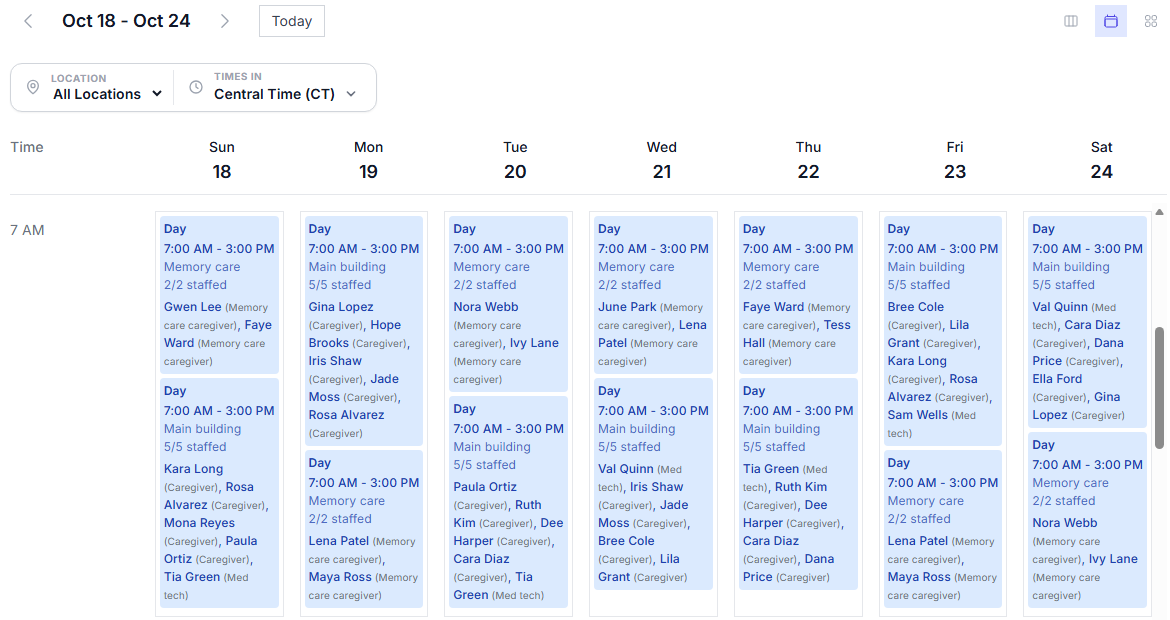
A week XShift AI generated for both buildings: every day shift filled, 5/5 in the main building and 2/2 in memory care.